

Strategy & Transformation
How to Calculate ROI for AI and Software Modernization
A practical, finance-ready framework for comparing AI and modernization investment with the current-state cost, realistic benefits, delivery risk and time to value.
operationalwrocław--:-- cet
∕ insights / sample-non-functional-requirements.md
Non Functional Requirements
Get 8 sample non functional requirements for SaaS and MVPs covering performance, security, uptime, and compliance, with templates you can adapt this year.
>_article.meta

Most MVPs don't stall because they lack features. They stall because nobody decided how fast, safe, reliable, or recoverable the product must be until a paying customer complains. By then, the team has already committed to an architecture, database, deployment model, and delivery timeline that may not support the quality customers expect.
That's why vague goals such as “the platform should scale” and “the app must be secure” are expensive. They don't give engineers a threshold to build against, a test to run, or an owner to hold accountable. The Software Engineering Institute notes that teams often identify functional requirements while neglecting quality requirements such as performance, safety, security, reliability, and maintainability.
The eight sample non functional requirements below turn those qualities into fill-in-the-blank statements. Each includes a measurable target, a validation method, and a trade-off to decide. They're ordered from launch-critical concerns to growth-stage operating discipline, so an MVP team can write the right requirements first instead of trying to specify everything at once.
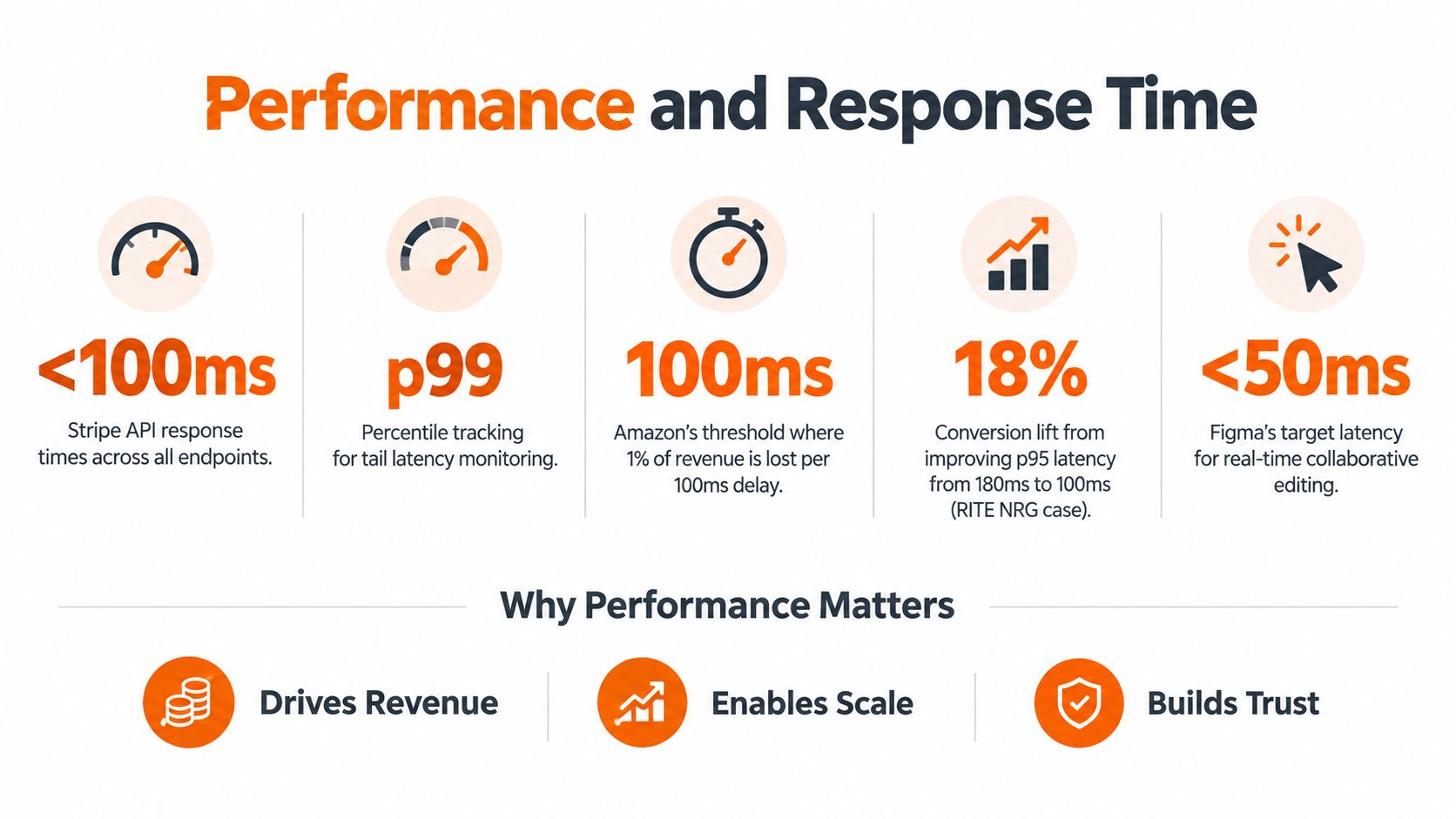
Slow software delays revenue. Users abandon onboarding, support teams handle more complaints, and sales teams lose confidence in the product. Performance belongs in the architecture conversation before engineers choose database indexes, caching strategies, API boundaries, or hosting regions.
Write the requirement in this form:
The system shall complete
[user action or API operation]within[latency threshold and percentile]under[defined workload, data volume, and environment], measured by[load-testing or production-monitoring method].
For example: “The API shall maintain p95 response time below 300 milliseconds for 1,000 requests per second against production-like data in the staging environment.” The threshold is meaningful because it names the percentile, workload, data conditions, and test environment. “The application must be fast” names none of them.
The University of Ottawa's engineering reference on non-functional requirements emphasizes measurable qualities such as response time, throughput, resource consumption, scalability, and fault tolerance. Use those dimensions to build a performance budget for the workflows tied directly to conversion or retention.
Run load tests with production-like data volumes and concurrency. Synthetic tests with tiny datasets often miss query-plan changes, cache misses, connection-pool exhaustion, and contention between background jobs and customer traffic.
Track real-user performance after release as well. Your release gate can require a passing load-test report, while production dashboards monitor p95 latency, error rate, throughput, and resource consumption.
The trade-off is clear. Lower latency may require caching, denormalization, regional deployment, or more infrastructure. Caching can reduce freshness, and aggressive optimization can make code harder to maintain. Decide which customer journeys deserve the strictest budget instead of demanding the same response time everywhere.
Growth becomes a crisis when “more users” is the only capacity plan. A SaaS team needs to know which workload will increase, how the system will respond, and what cost or performance boundary triggers architectural change.
Use this template:
The system shall support [concurrent users, requests per second, data volume, or job volume] while maintaining [performance and availability thresholds], scale through [horizontal, vertical, or elastic strategy], and demonstrate this through [realistic load test and capacity report].
A practical example is: “The platform shall sustain 2,000 concurrent sessions while keeping p99 response time below one second.” The empirical requirements analysis from Lund University illustrates why capacity deserves explicit scope. In its analysis of 2,113 requirements, 40% were classified as non-functional or combined functional and non-functional content, with 26% purely non-functional and 14% combining both types.
That's a material delivery concern. If the backlog estimates screens and workflows but ignores concurrency, data growth, queue depth, and recovery behavior, the estimate is incomplete.
For an MVP, separate stateless API components from stateful databases and queues wherever the business case supports it. Stateless services are easier to replicate, while stateful components need deliberate partitioning, replication, backup, and consistency decisions.
Define the capacity scenario around a real business event, such as a campaign launch, payroll run, reporting deadline, or customer import. Include:
Your cloud-native architecture planning guide should explain which components scale independently and which ones create a bottleneck. The trade-off is between early architectural investment and later migration risk. Sharding, partitioning, and multi-region design can slow an MVP, but retrofitting them during a growth emergency is far more disruptive.
For context on the business risk of postponing modernization decisions, review this analysis of avoiding the 84% failure rate. Treat the linked figure as source-specific, not as a universal prediction for your product.
Security requirements should identify what the system protects, from which threat, under what conditions, and how the team will verify the control. “The platform must be secure” leaves gaps that surface during a sales review, audit, or incident.
Use this requirement pattern:
The system shall protect [data class or asset] against [threat or unauthorized action] through [control], with [logging, detection, and response requirement], verified by [security test or review].
For example: “For authenticated customer traffic, the service shall reject unauthorized privilege escalation, with zero successful escalation cases in the security test suite.” The statement names the actor, context, failure condition, target, and evidence.
Threat-model identity flows, tenant isolation, secrets, integrations, administrative access, file uploads, exports, and recovery systems before implementation. Use established authentication and cryptography libraries. Keep secrets out of application code, and make encryption the default.
A launch-ready requirement set should address:
Write measurable acceptance criteria for each control. For example, require zero successful privilege-escalation cases in the test suite, complete audit records for sensitive actions, and documented owners for every response stage. Verify them through automated tests, review evidence, and a release checklist.
Every added control buys assurance at the price of user effort, storage, processing time, or development scope. Decide which actions justify adaptive authentication, which logs need long retention, and where recovery paths can remain simple. Protect conversion by reducing unnecessary steps, not by removing controls.

Reliability is not an infrastructure trophy. It is a business decision tied to what customers must be able to do. If a paid workflow is unavailable, revenue stops, trust declines, and support needs a clear explanation. Set the target from the impact of failure, not from a cloud provider's marketing page.
Use this requirement:
The service shall maintain [monthly availability target] for [defined customer-facing functions], excluding [documented maintenance or dependency conditions], with [failover and degradation behavior], verified through [uptime monitoring, incident records, and failover test].
For SaaS products, a 99.9% monthly availability target is one practical example. Define availability precisely. A health check may pass while users cannot complete a transaction. Decide whether degraded reporting counts as downtime when login and billing still work. Validate the definition with synthetic user journeys and incident records.
State recovery expectations in the same requirement. Set a recovery-point objective for acceptable data loss and a recovery-time objective for restoring service. Test both through documented restore and failover exercises. An untested runbook is an assumption, not evidence.
A reliable system limits the blast radius of dependency failures. Use circuit breakers and bulkheads to isolate failing components. Queue work that can wait, and serve cached or read-only content where appropriate. Keep one unavailable integration from taking down the whole product.
Assign operational ownership:
Redundancy, replication, failover automation, and on-call coverage are line items finance will question. Put billing and identity services on a different availability target than a low-risk internal reporting tool, then have product, finance, and engineering approve that split together. Start with the launch-critical workflows, and add stronger resilience only when failure impact justifies the added cost and complexity.
Fast delivery becomes expensive when engineers cannot change the product safely. Maintainability controls how quickly teams fix defects, add integrations, understand unfamiliar modules, and recover from incidents.
Use this fill-in-the-blank requirement:
The system shall allow [defined change or maintenance task] to be completed within [time, complexity, or quality threshold] without [unacceptable regression or operational impact], verified through [code analysis, test suite, review, or deployment evidence].
Set the target around risk, not style. Cover modular architecture, testability, documentation, dependency management, deployment safety, and the decisions future engineers must inherit. For example: “Every critical business workflow shall have automated regression tests that pass in CI before deployment, and each architectural decision affecting data, security, or integration boundaries shall be recorded in an ADR.” A payment boundary needs stronger evidence than a low-risk administrative view.
Put these checks in the Definition of Done:
The technical debt reduction guidance from RITE NRG frames debt as a delivery and operating concern, not only a code concern. It affects predictability, hiring, incident response, and the cost of every later change.
Speed today is borrowed from change capacity tomorrow. Start quality gates on paths that handle money, identity, customer data, and core workflows. Have senior engineers cost out each shortcut before it ships, including the future testing, refactoring, and incident work it creates. Decide which checks belong in the launch gate and which can wait until the product has growth-stage complexity.
A feature can work correctly and still fail commercially because users can't complete the task. Usability requirements turn opinions about “simple” design into observable behavior.
Write:
At least [percentage or count of representative users] shall complete [critical task] within [time limit] with [maximum error or accessibility condition], verified through [moderated testing, unmoderated testing, analytics, or accessibility review].
One useful example is: “95% of new users shall complete onboarding in under three minutes with no critical usability defects.” The requirement should identify the user group, task, time limit, and failure definition. Otherwise, a team can claim success because users eventually completed the workflow after support intervention.
Test usability before the interface is fully built. Review wireframes, prototypes, error messages, mobile layouts, keyboard navigation, screen-reader behavior, and recovery flows with people outside the engineering team. Product analytics should measure task completion, abandonment, time on task, validation errors, and repeated support actions.
Accessibility isn't a polish task to add after launch. Include keyboard access, focus order, semantic structure, contrast, labels, error recovery, responsive behavior, and assistive-technology testing in acceptance criteria. Automated scans can find some defects, but manual review remains necessary for interaction and comprehension problems.
Use progressive disclosure where workflows are complex. Prevent avoidable errors with clear constraints, preserve entered data when validation fails, and explain how users can recover. Don't make users interpret internal system errors.
The trade-off is design scope and validation effort. A single flow may need different behavior across desktop, mobile, keyboard, and assistive technologies. That work protects activation, support capacity, and customer confidence, but it can compete with new features. Prioritize the workflows that create first value, complete payment, manage data, or retain users.
Compliance failures arrive late because teams treat them as paperwork. By then, data models, vendors, retention policies, access paths, and deployment regions may already be wrong.
Use this statement:
The system shall process [regulated data] in accordance with [applicable regulation or contractual framework], enforce [privacy, access, residency, retention, and audit controls], and provide [verification evidence] before [release, customer onboarding, or audit milestone].
The right requirement is specific about data and evidence. “The platform must be GDPR compliant” is too broad to guide design. Specify data minimization, consent or lawful basis, deletion workflows, subject-access handling, retention, processor controls, breach procedures, and audit records where they apply.
Identify obligations during discovery. Data residency can determine cloud regions and service providers. Retention can determine storage architecture. Vendor assessments can determine whether an integration is suitable. Audit logging added after launch is usually more expensive and less complete than logging designed into the data access model.
Assign each control to a responsible person, then define the evidence:
Your legal compliance audit automation case study shows the type of operational discipline required when compliance becomes an ongoing process rather than a one-time certification project.
The trade-off is speed versus eligibility for customers and markets. Some controls add friction or restrict provider choices, but ignoring them can block enterprise sales or force a redesign. Product, engineering, security, legal, and operations should agree on the minimum acceptable control set before the first production build.
A launch without observability is a launch without reliable feedback. Your team can't protect availability, performance, or customer trust if it can't connect an incident to a request, user, dependency, deployment, or data operation.
Use this template:
The service shall emit [structured logs, metrics, and traces] for [critical workflows and dependencies], correlate requests with [unique identifier], alert within [detection threshold] for [business-impacting condition], and provide [dashboard or runbook] for diagnosis and response.
Instrument during development, not after the first incident. Capture request latency, error rates, queue depth, database performance, dependency health, deployment markers, and business signals such as failed checkouts or incomplete onboarding. Structured logs with consistent fields make investigations searchable. Correlation IDs let engineers follow a request across services and asynchronous jobs.

Dashboards should answer operational questions quickly. Can customers log in? Which workflow is failing? Is the problem regional? Did a deployment or dependency change precede it? What percentage of requests are affected? Vanity metrics won't help an incident commander make those decisions.
Define who owns each alert and what happens next. A useful operational requirement might state that a critical availability alert creates an incident, pages the assigned responder, links to the relevant dashboard and runbook, and records the timeline for postmortem review.
Business and technical metrics must work together:
The trade-off is signal quality versus observability cost. Logging everything can create noise, storage expense, and privacy risk. Logging too little leaves engineers guessing. Sample high-volume data where appropriate, retain security and audit events according to policy, and keep the fields needed to answer real business questions.
Use the following video as an additional visual introduction to live monitoring and production visibility.
| Item | Implementation Complexity 🔄 | Resource Requirements ⚡ | Expected Outcomes 📊 | Ideal Use Cases ⭐ | Key Advantages & Tips 💡 |
|---|---|---|---|---|---|
| Performance and Response Time | Medium–High; needs performance engineering and load validation | High; monitoring, RUM, load-testing infra, CDNs | Lower latency, higher conversion & retention; measurable SLAs | High-traffic SaaS, real-time collaboration, payment APIs | Define performance budgets early; test with production-like loads; continuous monitoring |
| Scalability and Capacity Planning | High; architectural design (sharding, autoscale) | High; cloud infra, staging load environments, capacity modeling | Predictable growth handling, stable cost-per-user | Rapid-growth platforms, streaming, multi-tenant SaaS | Separate stateful/stateless, validate scaling assumptions, plan sharding early |
| Security and Data Protection | High; architecture-embedded controls and threat modeling | High; security expertise, audits, encryption & secrets tooling | Reduced regulatory risk, customer trust, enterprise deals | Payments, healthcare, identity platforms, enterprise SaaS | Encrypt by default, use proven libraries, perform early threat models and pen tests |
| Reliability and Availability (Uptime/SLA) | High; redundant design, failover, runbooks | High; multi-region deployments, replication, ops support | High uptime SLAs, reduced downtime cost, SLA-backed contracts | Revenue-critical services, mission-critical infrastructure | Design for graceful degradation, use chaos testing, automate incident response |
| Maintainability and Code Quality | Medium; CI/CD, standards, code review processes | Medium; testing frameworks, linters, documentation effort | Sustained velocity, lower technical debt, easier onboarding | Long-lived products, fast-evolving codebases, teams with rapid delivery goals | Automate lint/tests, budget refactoring, use ADRs and enforce DoD |
| Usability and User Experience (UX) | Medium; iterative research and usability testing | Medium; UX research, testing participants, accessibility tools | Higher conversion, retention, lower support costs | Consumer SaaS, onboarding-heavy flows, marketplaces | Test early with real users, make accessibility non-negotiable, measure onboarding metrics |
| Compliance and Regulatory Requirements | High; legal alignment and architecture constraints | High; audits, certifications, data-residency controls | Access to regulated markets, reduced legal/financial risk | Healthcare, finance, enterprise customers, regulated markets | Identify regs early, implement audit logging and privacy-by-design, continuously audit |
| Monitoring, Observability & Operational Support | Medium–High; instrumentation and observability design | Medium–High; logging/tracing storage, APM, dashboards | Faster MTTR, proactive detection, data-driven ops | Microservices, distributed systems, high-change environments | Instrument during development, use structured logs and correlation IDs, tune alerts |
Start with the three failures that would hurt revenue most. For a subscription product, that may be performance during onboarding, availability of the paid workflow, and protection of customer data. For a regulated product, security and compliance may outrank feature breadth. For a data-heavy platform, capacity and recoverability may decide whether the first major customer becomes an opportunity or an incident.
Write each priority as a complete requirement, not a quality label. Name the actor, context, workload, threshold, failure condition, verification method, owner, and release gate. “The service shall maintain p95 API latency below 300 milliseconds for 1,000 requests per second, verified by a production-like load test before release” is actionable. “The API should be fast” is not.
The SEI business-case review summarizes estimates that 42% to 64% of defects originate during requirements engineering, with 50% often cited as a common estimate. The same review reports that correcting a requirements defect after field deployment can cost 50 to 200 times more than correcting it during requirements work. It also reports requirements rework consuming approximately 40% to 50% of total effort on many projects, while broader Carnegie Mellon data places rework at 60% to 80% of software-development cost.
Those figures explain why NFRs belong in discovery, estimation, architecture, acceptance criteria, and sprint reviews. They're not a separate document that engineers consult when the feature work is finished. Every requirement should trace to an architectural decision, an automated test or monitoring signal, and a person responsible for keeping the target true after launch.
An MVP doesn't need every possible quality attribute specified at enterprise depth. It does need explicit protection for the workflows that create revenue, handle sensitive information, or could destroy trust if they fail. Add stricter requirements as usage, geography, regulation, integrations, and customer expectations grow.
AI-assisted delivery changes the economics of implementation, but it doesn't change the standard of evidence. The AI Journal analysis reports an analysis of 211 million changed code lines from 2020 to 2024, including an eightfold increase in duplicated code blocks and projected doubling of code churn. It also cites a 9% increase in bug rates, a 91% increase in code-review time, and a 154% increase in pull-request size associated with increased AI adoption.
Use AI agents to accelerate analysis, implementation, testing, documentation, and migration. Keep senior engineers accountable for architecture, data, security, test evidence, maintainability, and production quality. Require every AI-assisted change to identify its source and reviewer, pass security and dependency scans, include tests for critical paths, and meet the same complexity, duplication, documentation, and operational standards as human-authored code.
That's the #riteway approach: extreme ownership, early risk identification, transparent communication, and senior accountability for the complete result. A strategic partner won't promise every target without examining the trade-offs. They'll challenge an impossible latency goal, expose the cost of multi-region availability, identify compliance dependencies, and move the decision forward before the project absorbs the risk.
Review your three launch-critical requirements in every sprint. Track the measured result, not the intention. Move the remaining categories into a prioritized backlog and revisit them as customers, data, integrations, and compliance needs change. Clear targets now are cheaper than emergency rewrites later.
Rite NRG helps companies define architecture, security, performance, reliability, testing, documentation, release controls, and ongoing operations for business-critical software. Its AI-native engineering model uses agentic AI to accelerate delivery while senior architects and engineers remain responsible for the standards that make a system safe to launch and sustainable to own.
Rite NRG offers software consulting, AI-native engineering, modernization, testing, and managed technology services for teams that need measurable non-functional requirements rather than vague delivery promises. Visit Rite NRG to discuss your launch-critical targets, validation plan, and long-term operating model.
/ about the author
Written by the RITE NRG editorial team — the architects, engineers and delivery leads who build and operate AI-era software for our clients.
Strategy & Transformation
A practical, finance-ready framework for comparing AI and modernization investment with the current-state cost, realistic benefits, delivery risk and time to value.
AI Consulting & Automation
A practical framework for choosing and deploying transport or logistics AI agents around real exceptions, reliable data and controlled operational authority.
Industry Solutions
A practical roadmap for improving manufacturing systems and introducing AI without destabilising production, data integrity or operational control.
More guidance: all insights articles
Tell us about the system or idea behind this article. We tell you honestly if it is a fit — and what a fixed-scope delivery could look like.