A lot of leadership teams ask what is haptics only after they've already felt the gap in their product.
A payment flow feels flat. A wearable sends alerts that users miss. A simulator looks impressive in a demo but doesn't feel convincing in use. The product works, but it doesn't communicate with enough confidence. That's the problem haptics solves.
The mistake is treating haptics as a minor hardware add-on. It isn't. It's a product communication layer. When you design it well, users get faster confirmation, clearer guidance, stronger trust, and a more premium sense of quality. When you design it badly, you get noise, battery drain, and a gimmick nobody respects.
Beyond the Buzz Understanding Haptic Feedback
A dead interface makes users work harder than they should. They tap twice because they aren't sure the input registered. They look back at the screen for confirmation. They hesitate in moments that should feel instant.
A good haptic interaction removes that hesitation. A crisp pulse can confirm a payment, signal a successful biometric check, or distinguish a warning from a routine update without forcing the user to decode another visual state.
Haptics is product communication through touch
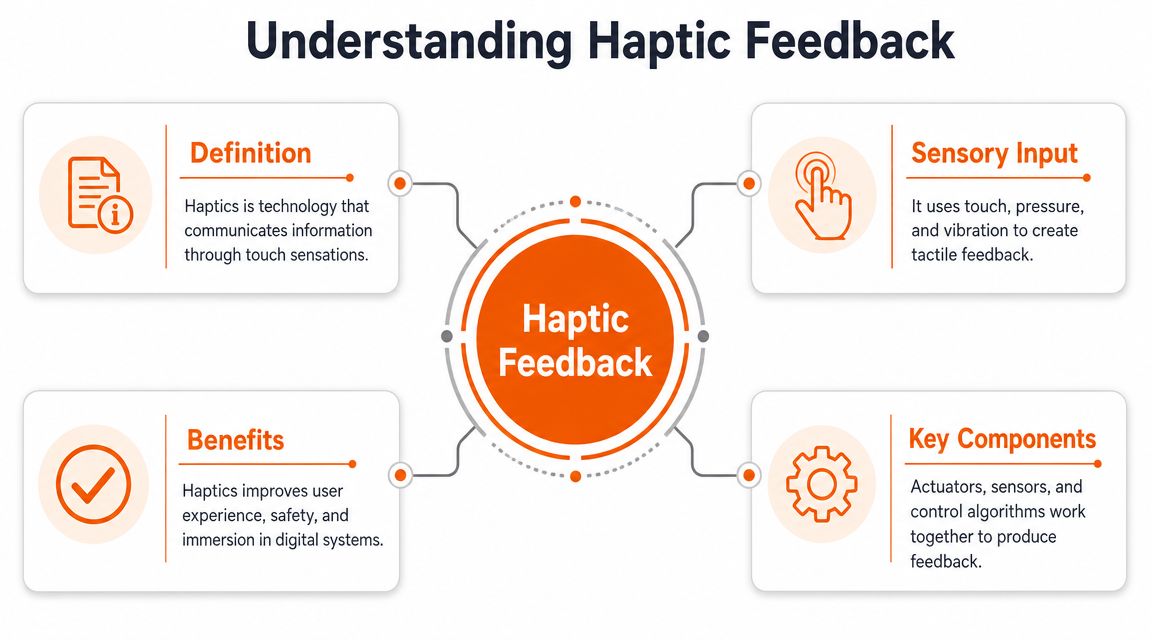
In practical terms, haptics is touch-based feedback technology that adds vibration, force, temperature, or motion cues to digital interfaces, as described in the Wikipedia overview of haptic technology. That matters because it shifts haptics out of the “phone buzz” category and into a serious product design conversation.
The same reference notes that the global haptics market is projected to reach USD 7.1 billion by 2035, growing at a 4.4% CAGR from 2024 to 2035. That projection helps explain why more product teams now treat touch as a core interaction layer rather than a novelty.
If you're asking what is haptics from a business perspective, the answer is simple. It helps your product communicate state, intent, urgency, and quality without adding visual clutter.
Practical rule: If a user benefits from immediate confirmation but doesn't need more text or another modal, haptics is usually the right tool.
Tactile and kinesthetic are not the same thing
Leadership teams often lump all haptics together. That's sloppy thinking, and it leads to poor decisions.
There are two broad modes worth separating in product strategy:
- Tactile feedback is the most commonly recognized form. Short vibrations, taps, surface-like sensations, and touch cues delivered through a phone, watch, controller, or panel.
- Kinesthetic feedback is about force and resistance. It shows up in steering systems, robotic controls, training rigs, and devices that simulate push, pull, weight, or constraint.
- Thermal or motion-led cues extend the idea further. In some products, temperature or movement becomes part of the feedback language instead of a simple vibration event.
The distinction matters because these modes serve different outcomes. Tactile haptics often improves speed and clarity in routine interactions. Kinesthetic haptics is stronger when you need control, realism, or motor learning.
Stop designing for sight alone
Many digital products still assume users will always look directly at a screen and process a visual message in time. That's not how real usage works. People move, multitask, and operate in noisy environments.
A strong haptic layer gives your product another channel. It can confirm, warn, guide, and reassure. That makes the experience feel more deliberate and more premium.
The leadership decision isn't whether haptics is interesting. It's whether your product can afford to stay silent when touch could communicate better.
The Engine Room Core Haptic Technologies
A product team picks an actuator the way many teams pick a battery or a connector. Late, quickly, and with too little debate. That mistake shows up later as weak button feel, inconsistent alerts, higher tuning effort, and a product that feels cheaper than it looks.
Actuator choice sets the ceiling for the experience. If leadership wants haptics to increase confidence, improve task speed, or create a premium brand signature, the hardware decision has to support that outcome from day one.
ERM is the budget option
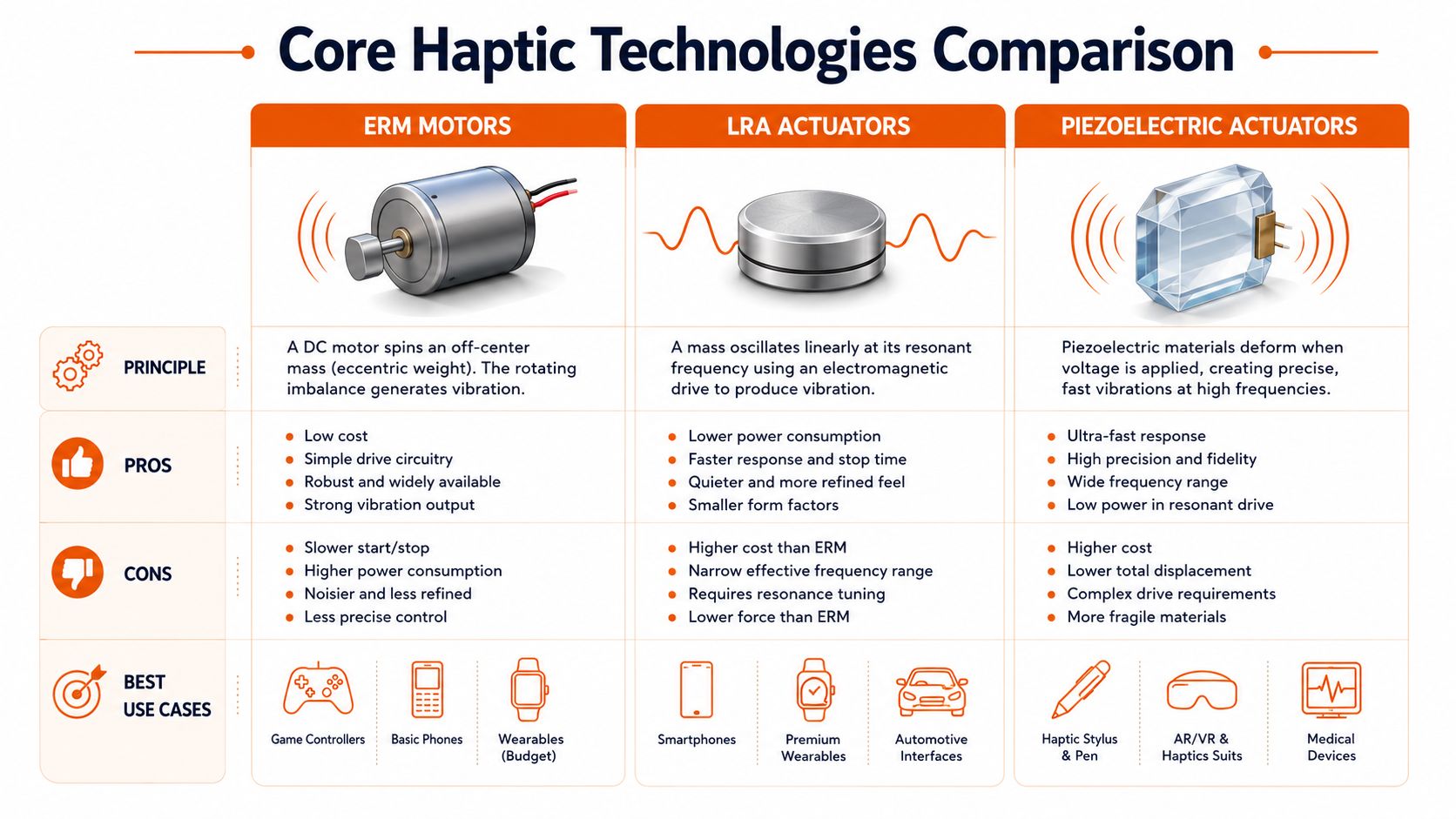
ERM, short for eccentric rotating mass, is the old standby. It is inexpensive, easy to source, and good enough for basic vibration alerts.
It is also the fastest route to a generic feel. ERM motors ramp up and wind down more slowly than other options, so effects feel blurrier and less intentional. Use ERM when the product only needs coarse acknowledgement and cost control matters more than tactile quality. Skip it if the interaction is part of your differentiation strategy.
LRA is the default for products that need to feel polished
LRA, or linear resonant actuator, is the right call for many mobile, wearable, and handheld products. It produces tighter, cleaner effects than ERM and usually gives teams a better balance between feel, power use, and integration effort.
For leadership teams, that balance matters. LRA often gets you from “it vibrates” to “it feels designed” without forcing a full premium architecture. If your goal is better input confirmation, clearer state changes, and a stronger perception of quality, start here.
Piezo is the premium path
Piezo actuators respond quickly and support much sharper tactile effects. That opens up a different product strategy. You can create crisp button clicks, short guidance cues, and more expressive touch patterns that feel immediate rather than mushy.
That precision has business value. Premium haptics can make frequent interactions feel faster, reduce uncertainty in dense interfaces, and give your product a sensory signature competitors struggle to copy. The trade-off is real. Piezo demands tighter mechanical design, better control logic, and more disciplined tuning.
| Actuator | Best fit | Strategic downside |
|---|---|---|
| ERM | Low-cost alerts and basic vibration | Generic feel, slower response, weaker differentiation |
| LRA | Mainstream premium mobile and wearable feedback | Less flexible than piezo for highly expressive effects |
| Piezo | Crisp, expressive, high-frequency interactions | Higher integration effort and tighter design constraints |
Choose the actuator by working backward from the moment that matters most. A safety warning, a virtual button press, a wearable notification, or a training cue each needs a different tactile profile. Teams comparing top sim racing wheels already understand this principle. The hardware choice changes the quality of control, not just the presence of feedback.
That is why haptics should sit inside product strategy, not just component selection. The actuator affects enclosure design, driver behavior, firmware timing, battery performance, and perception of quality at launch. If your team is building a connected device, read how embedded software shapes hardware behavior in shipped products before you lock the architecture.
Haptics in Action Real World Applications
The fastest way to understand haptics is to look at where it changes behaviour, not where it adds decoration.
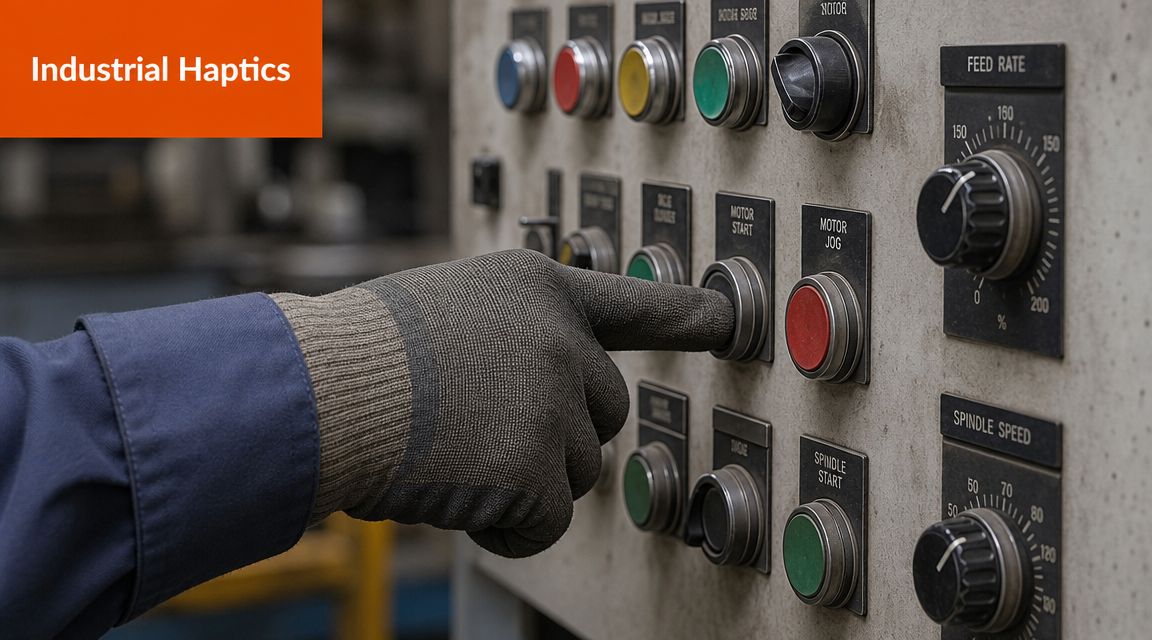
Industrial controls are a strong example. In a noisy environment, operators can't rely on sight and sound alone. A control panel that confirms input through touch reduces uncertainty and helps the interface communicate under pressure.
Training and simulation
Haptics becomes much more than feedback when the goal is learning. In simulation, touch closes the gap between visual representation and physical understanding. That matters in driver training, industrial rehearsals, and immersive skill development.
If you want a simple consumer example, look at the ecosystem around racing simulators. Buyers comparing top sim racing wheels care a great deal about force feedback quality because it changes control, immersion, and training value. The wheel isn't just output hardware. It's the mechanism that teaches the user what the surface, grip, and vehicle are doing.
This same principle scales into professional environments. When touch communicates resistance, traction, or contact, users build muscle memory faster and make fewer hesitant inputs.
Medical and rehabilitation use
Healthcare is where haptics stops being “cool” and starts being accountable.
A 2024 systematic review of 34 studies found that haptic devices improved sensorimotor performance, with post-stroke motor-function improvements reported with effect sizes between 0.35 and 0.87, according to the UK-based biomedical review on haptic devices in rehabilitation and clinical skills. That's the kind of evidence leadership teams should pay attention to. It positions haptics as a measurable clinical tool, not just a digital sensation.
The operational takeaway is clear. In rehabilitation and training contexts, haptics can support better repetition quality, clearer motor guidance, and more realistic practice environments.
If touch improves skill acquisition or recovery quality, haptics belongs in the product brief from day one.
A short look at the wider ecosystem helps here:
Automotive, wearables, and connected systems
In vehicles and wearables, haptics works because it's immediate and discreet. A steering wheel pulse, seat cue, or wrist alert can direct attention without demanding a visual scan.
That's why haptics often fits naturally into connected product strategies. If your organisation is building device ecosystems, operational platforms, or sensor-driven products, the key challenge isn't just the haptic event itself. It's orchestrating signals across hardware, firmware, and cloud logic. Teams tackling that stack usually benefit from a stronger view of IoT consulting for connected product delivery.
The pattern across sectors is consistent. Haptics creates value when users need confidence, timing, guidance, or realism. It's not there to decorate the interaction. It's there to make the interaction work better.
Driving Business Value with Haptic Experiences
A lot of product teams still defend haptics as a UX flourish. That's underselling it. Used properly, haptics supports commercial outcomes because it changes how users interpret quality, reliability, and responsiveness.
When a product responds through touch with precision, users don't just notice the effect. They read the whole system as more capable.
Haptics improves clarity and reduces friction
Every ambiguous interaction costs you. Users repeat actions, pause to verify state, or mistrust whether a critical step completed. A well-designed haptic cue cuts through that uncertainty.
This is especially valuable in flows where confirmation speed matters. Payments, authentication, navigation prompts, wearable alerts, and industrial actions all benefit when the product acknowledges intent instantly and consistently.
That doesn't mean “more vibration”. It means better signal design. One strong haptic language is worth more than a dozen random buzzes.
Haptics supports accessibility and broader usability
Too many product teams frame accessibility as a compliance topic instead of a design advantage. That's short-sighted. Touch gives users another route to understanding the interface, and in some contexts it's the most effective route.
For users who miss visual cues, operate in motion, or interact in distracting environments, haptics can improve comprehension and reduce reliance on screen attention. That makes the product easier to use, not just more inclusive.
Here's the strategic point. Features that improve accessibility often improve mainstream usability too. Haptics is one of those features.
Haptics can elevate brand perception
Premium products feel intentional. They don't just look polished. They respond with confidence.
That's why haptics belongs in the same brand conversation as animation, audio identity, materials, and motion design. If you want a useful parallel from live brand experiences, it helps to learn about experiential marketing from PSW Events. The underlying lesson is the same. Memorable experiences aren't built through visuals alone. They work because multiple senses reinforce the brand promise.
- For SaaS platforms with hardware touchpoints: haptics can make workflows feel faster and more trustworthy.
- For consumer devices: it can become a differentiation layer users feel immediately, even if they never name it explicitly.
- For industrial and operational tools: it can improve guidance, reduce hesitation, and signal state without adding dashboard clutter.
Products earn trust in milliseconds. Touch is one of the fastest ways to establish it.
Leadership teams should treat haptics as a strategic trade-off. If it strengthens clarity, accessibility, and product feel in a core journey, it deserves budget and ownership. If it doesn't, cut it. The win comes from intent, not from adding another feature line to the roadmap.
Integrating Haptics into Your Product Roadmap
A team approves haptics late in the roadmap, adds a few vibration cues before launch, and expects the product to feel premium. It never works. Users notice inconsistency faster than effort, and weak tactile feedback makes the whole experience feel cheaper than it is.
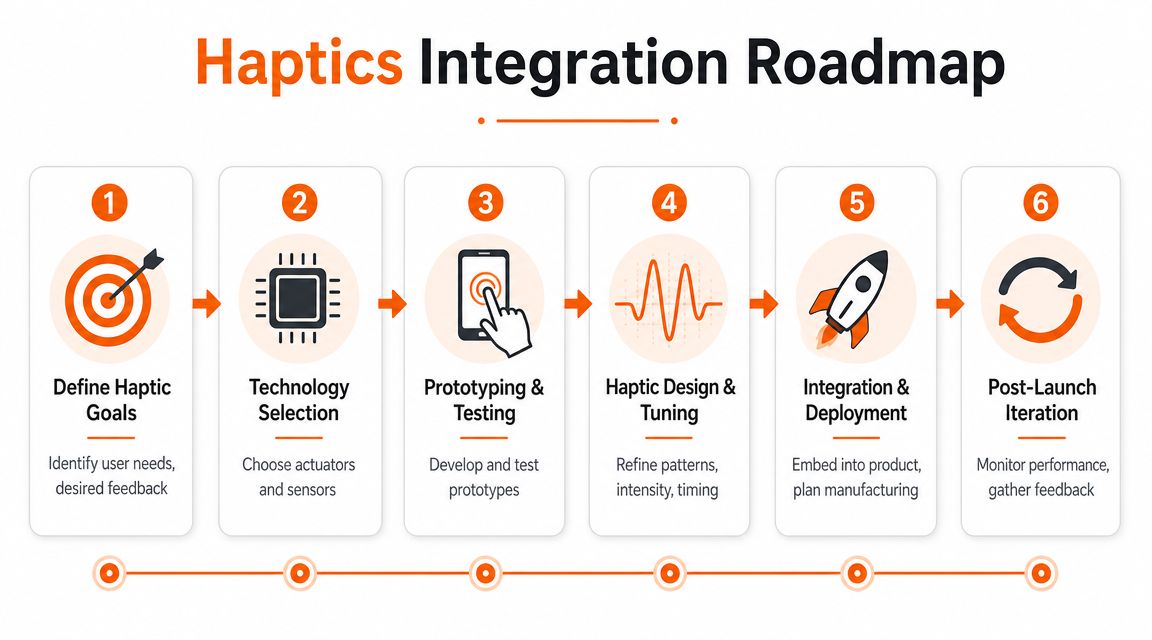
Treat haptics like a product system from day one. The roadmap has to connect user intent, hardware capability, software control, and validation. That is how you turn touch into a differentiator instead of a cleanup task.
Start with moments, not motors
Start by identifying the moments where touch can remove doubt, speed up action, or make the product feel more intentional. If you cannot point to a specific user decision or behavior you want to improve, do not put haptics on that path.
Use four questions to set scope:
- Where do users hesitate? Payment confirmation, mode switching, form submission, control activation.
- Where is visual attention already overloaded? Dense dashboards, mobile use in motion, wearable interactions.
- Where does timing affect task success? Safety prompts, rapid input, guided workflows.
- Where does tactile quality influence perceived product quality? Premium devices, advanced controllers, customer-facing hardware.
Assign one owner to the end-to-end interaction outcome. Split ownership creates mediocre results fast.
Choose the actuator based on response needs
This decision is strategic, not academic. The actuator determines what kind of product feel you can deliver, how much power you will spend, and how much tuning headroom your team gets later.
Immersion's technical paper on touch-screen handheld haptics explains the trade-off clearly. Faster response and better waveform control support sharper, more expressive effects. Simpler actuator options can still work well for basic alerting.
Use that logic to make the call:
| Product need | Best direction |
|---|---|
| Basic alerting | Use a lower-complexity actuator strategy |
| Frequent confirmation cues | Choose hardware that can respond quickly and repeat cleanly |
| Premium feel and tight timing | Prioritise waveform control and fast response |
| Battery-sensitive device | Limit effect complexity and manage duty cycle carefully |
Do not buy advanced hardware for a shallow use case. Do not expect bargain hardware to carry a premium interaction model.
Build a haptic language
Random haptics is product debt. Every extra effect trains users to ignore the next one.
Define a small, repeatable haptic language:
- Confirmation cues should be short, clear, and consistent.
- Warnings should feel distinct from success events.
- Navigation or guidance patterns should support orientation without becoming annoying.
- Brand-led delight moments should be rare and intentional.
Platform-native tools are important at this step. On Apple platforms, Core Haptics gives teams deeper control over custom patterns. On Android, native vibration frameworks support structured feedback across common interaction types. Some teams also assess specialised SDKs when they need tighter consistency across hardware variants, but that added control only pays off if the product experience justifies the integration cost.
Prototype early and tune with users
Haptics exposes weak assumptions fast. A cue that sounds good in a workshop can feel muddy, late, or irritating in the actual device.
Run a short testing loop and keep it cross-functional:
- Prototype in the physical form factor. Desktop simulation is not enough.
- Test in realistic conditions. Walking, noise, gloves, divided attention, repeated use.
- Review with product, design, and engineering together. Touch quality is a shared decision.
- Tune intensity, timing, and duration together. Isolated tweaks rarely fix the full experience.
The best haptic effects feel obvious to users because the team worked hard to remove ambiguity.
Ship with governance, not guesswork
Once the library is defined, govern it like any other product system. Document usage rules. Map each pattern to a product state. Block ad hoc additions that dilute meaning across teams and releases.
That discipline protects two things leadership should care about. Product consistency and implementation cost. A governed haptic system is easier to scale, easier to test, and much harder to break with rushed feature work.
The Future of Touch Trends and Challenges
The next phase of haptics won't be limited to stronger phone vibrations. It's moving towards richer, more varied touch experiences across surfaces, air, wearables, robotics, and spatial interfaces.
That creates opportunity, but only for teams willing to separate signal from theatre.
New modalities will reshape interaction design
The broad haptics category includes more than vibrotactile output. Neutral overviews describe touch-based communication through force, vibration, motion, electrical impulses, thermal changes, or ultrasound, as outlined in the D-BOX overview of haptic technology. That broader framing matters because different modalities solve different business problems.
Mid-air haptics can reduce dependency on physical contact in some environments. Force feedback can improve training and remote operation. Thermal or electrotactile approaches can create more expressive cues where vibration alone falls short.
The strategic takeaway is simple. Don't ask for “haptics” as if it's one thing. Ask which modality best supports the job the user needs to do.
The hard part is adoption, not invention
Most emerging haptic concepts struggle with the same issues:
- Power constraints: richer effects can compete with battery expectations.
- Component cost and sourcing: advanced hardware choices increase delivery risk if procurement isn't aligned early.
- Discoverability: users won't benefit from interactions they don't realise exist.
- Cross-device consistency: the same intended effect can feel different across hardware classes.
That's why future-proof product strategy needs restraint. Chasing novelty is easy. Building a touch layer users understand, trust, and rely on is harder.
Leadership should plan for selective advantage
The winning posture isn't “adopt every new haptic modality”. It's to watch the field closely, prototype selectively, and invest where touch removes a real user constraint.
If your product needs silent guidance, richer simulation, safer controls, or stronger non-visual communication, the future of haptics is relevant now. If not, keep your architecture flexible and wait until a specific use case justifies the complexity.
Take Ownership of Your User Experience
Haptics is one of those decisions that reveals how a team thinks.
Teams with weak ownership treat it as optional polish. They add a few buzzes near launch, call it enhancement, and move on. Teams with strong ownership ask a better question. Where would touch reduce uncertainty, improve confidence, or make the product feel unmistakably better?
That mindset matters more than the hardware brand or API choice. Products don't become memorable by accident. Someone decides that the user experience deserves precision, then follows through across design, engineering, testing, and rollout.
If your product includes moments where users need immediate confirmation, silent guidance, motor learning, or premium interaction quality, you should be evaluating haptics now. Not later. Not when a competitor turns it into a differentiator first.
A stronger tactile experience won't rescue a weak product strategy. But in a well-defined product, it can sharpen trust, reduce ambiguity, and create a level of polish users feel before they can explain it.
If you're refining the broader interaction layer around touch, motion, flow, and response quality, it's worth grounding that work in a wider view of user experience optimisation. The products that win don't leave these details to chance.
Take ownership of the experience. Design touch with intent. Build it like it matters, because users can tell when it does.
Rite NRG helps product leaders turn ideas like haptics into predictable delivery plans with senior engineering support, product-first advisory, and a high-ownership execution model. If you want a team that can assess the business case, shape the roadmap, and deliver the software and hardware-facing integration work with speed and clarity, talk to Rite NRG.