Your team shipped a map. It renders fast enough, the markers load, the demo looked polished, and nobody can point to a business result. Sales isn't using it to win deals. Ops isn't using it to make decisions. Customers try it once and go back to spreadsheets.
That's the trap.
Most SaaS teams treat technology in mapping like a front-end feature. Add a provider, drop in an SDK, style a few layers, call it done. That gives you visual output, not strategic value. If the map doesn't change user behaviour, reduce friction, improve workflows, or create a product advantage, it's just expensive decoration.
A CTO needs a harder standard. Mapping should earn its place in the product by improving speed, clarity, coverage, or monetisation. That means choosing the stack, data model, and delivery pattern around business outcomes first. That's the #riteway lens. Own the result, not just the implementation.
Beyond Pins on a Map Why Your Approach Is Failing
A common pattern looks like this. A SaaS company builds a location view because customers asked for “a map”. The team picks a popular API, wires up geocoding, adds filters, and launches. Usage is polite but shallow. Support tickets rise because addresses don't resolve cleanly. Product can't explain whether the feature helps retention. Finance starts noticing map usage costs. Engineering gets stuck maintaining something nobody can defend.
That failure usually starts with the wrong question. Teams ask, “Which map provider should we use?” The better question is, “What decision will this map help the user make faster and better?”
The real product job of a map
In a SaaS product, a map can do several jobs. It can help a dispatcher allocate work. It can help a property platform compare locations. It can help an insurance product assess exposure. It can help a mobility app reduce uncertainty. Those are not the same problem, so they should not share the same architecture by default.
Practical rule: If your map exists to “show locations”, you haven't defined the product value tightly enough.
The bigger point is economic, not cosmetic. Geospatial data and services contributed an estimated £6.3 billion in direct gross value added to the UK economy in 2023, which shows that mapping now sits inside the operating backbone of public services and commercial platforms, not at the edge of them, as noted in this overview of UK geospatial impact.
That should change how you think about priority. Technology in mapping isn't a UI enhancement. It's an infrastructure decision with product consequences.
Users don't want maps. They want certainty.
Look at a practical consumer example such as find 12801 train status for pickups. The value isn't the map itself. The value is reducing uncertainty around timing and coordination. Enterprise SaaS buyers want the same thing. They don't pay for pins. They pay for better decisions.
So stop approving mapping work because competitors have a map tab. Approve it when you can tie it to one of these outcomes:
- Operational speed: Users complete a workflow faster because location context is embedded where they already work.
- Decision quality: Teams can prioritise routes, assets, incidents, or territories with less guesswork.
- Commercial advantage: Sales, service, or analytics teams can offer location-aware features customers will pay for.
- Lower friction: Users need fewer manual steps to interpret spatial data.
If your current mapping work doesn't hit one of those, reset it. The right move isn't more layers, more controls, or fancier styling. The right move is product discipline.
The Modern Mapping Tech Stack Deconstructed
Most mapping systems look confusing because teams see one thing on screen and assume it's one technology. It isn't. A modern map stack is closer to a professional kitchen. Ingredients come in from different suppliers, prep happens away from the customer, the cooking line assembles the dish, and the waiter delivers the final experience. If one station is weak, the whole service degrades.
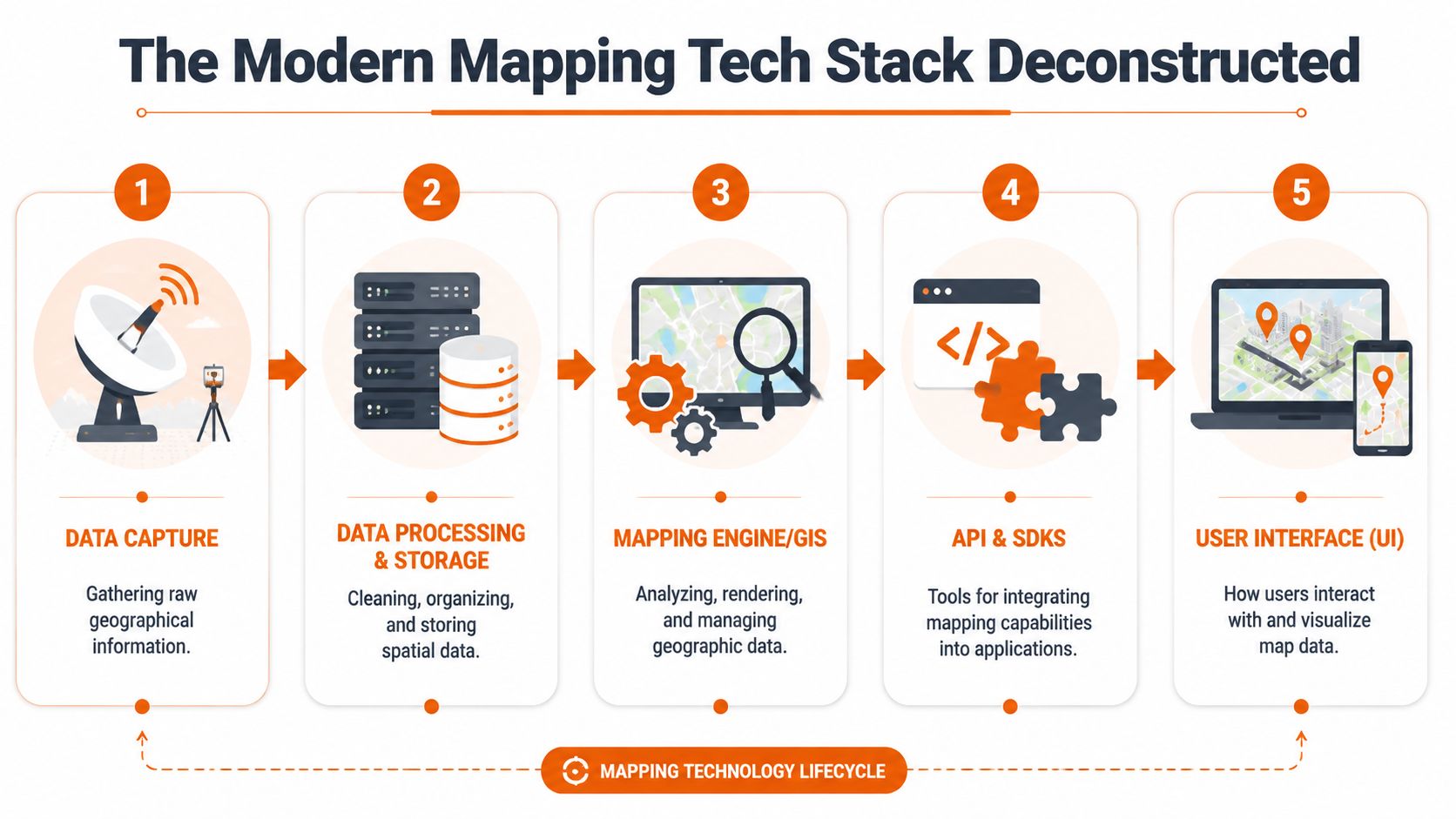
Five layers you need to manage
Data capture
Data capture is the starting point for raw location information. That may include GPS traces, field-entered addresses, satellite imagery, sensor data, mobile app telemetry, or imported shapefiles. If this input is unreliable, every downstream feature inherits the problem.Data processing and storage
Raw spatial data needs cleaning, indexing, normalising, and storing in a format your application can query efficiently. Such processing often involves geocoding, reverse geocoding, routing preparation, geometry simplification, and enrichment.Mapping engine or GIS layer
This is the analytical core. It renders layers, runs spatial queries, manages features, and handles the logic behind things like clustering, overlays, buffers, and route calculations.APIs and SDKs
These are the integration surface. They let your product teams connect the geospatial engine to web apps, mobile apps, internal services, and partner systems.User interface
This is the visible part customers touch. It includes map controls, layers, filters, drawing tools, search, and the surrounding workflow that turns map data into action.
Why CTOs should care about the stack, not just the provider
The UK's move into digital mapping marked a significant shift when mapping stopped being static output and became a continuously updated dataset. OS MasterMap in 2001 created a database-driven digital mapping model that enabled GIS-based decision-making across the economy, as described in this account of the UK's digital mapping shift.
That's the lesson for SaaS products. The strategic value isn't in drawing a map image. It's in building a location-aware data system that other product capabilities can query and reuse.
To see how geospatial information fits into broader product architecture, this breakdown of geospatial data in modern software products is worth reviewing with your engineering leads.
Later in delivery, infrastructure choices also matter. If your mapping backend relies on Node services for tile generation, event processing, or API orchestration, your deployment model affects reliability and cost. This guide to Node.js app deployment strategies is useful because map-heavy workloads punish weak runtime and hosting decisions fast.
A short visual primer helps if you need to align product and engineering around the stack:
Treat the map UI as the last mile, not the system. Most delivery mistakes happen because teams optimise the last mile first.
Game-Changing Techniques for Competitive Advantage
The gap between a basic mapping feature and a defensible product advantage comes down to implementation choices. Not trendy labels. Choices.
AI and ML should remove manual work
If your team still relies on people to tag, reconcile, or classify large volumes of spatial data by hand, you're burning time in the wrong place. Use AI and ML where they remove repetitive interpretation work. Good candidates include feature extraction from imagery, anomaly detection in movement data, address matching support, and automated categorisation of incoming location records.
The business gain isn't “using AI”. It's reducing operational drag so your specialists spend time on exceptions, not bulk processing.
Cloud-native architecture is about elasticity, not fashion
Map usage is uneven. A field operations platform may spike during business hours. A logistics product may surge during incidents. A property platform may see heavy read traffic and low write traffic. Static infrastructure planning rarely fits that pattern.
Cloud-native design helps when your workload changes shape quickly, when regional performance matters, or when you need separate scaling paths for ingestion, processing, and rendering. It's a poor choice only when your product usage is simple and stable enough that extra architectural complexity buys you nothing.
Real-time mapping changes product behaviour
A static map helps users inspect. A real-time map helps users act.
That difference matters. Live asset positions, fleet movement, occupancy changes, incident updates, and location-triggered alerts can turn a passive view into an operational console. If your product supports dispatch, monitoring, service coordination, or dynamic coverage decisions, real-time capabilities usually deserve priority over visual polish.
For a related example of spatial technology becoming operational rather than illustrative, this look at drone systems in warehouse operations shows how location intelligence becomes part of active workflows.
Vector tiles are one of the highest-leverage decisions you can make
Raster tiles are simple. Vector tiles are flexible.
If you need dynamic styling, smooth zoom behaviour, smaller payloads, device-specific rendering, or custom thematic views, vector tiles are often the better long-term choice. They also give product teams more freedom to adapt the experience without rebuilding the whole rendering pipeline every time the design changes.
Use them when map performance and customisation are core to the user experience. Don't force them into a lightweight admin panel that only needs a few points and a search box.
The winning pattern is simple. Use advanced techniques only when they shorten a workflow, sharpen a decision, or lower the cost of delivery.
A lot of teams miss that. They overbuild 3D, underinvest in data quality, and then wonder why customers don't care. Competitive advantage in technology in mapping comes from solving a sharper problem than your competitors, not from assembling a louder stack.
Choosing Your Tools SaaS vs Enterprise Trade-Offs
Often, CTOs lose months at this point. They frame the choice as “Mapbox or Google Maps Platform versus custom”. That's too shallow. The crucial decision is whether your mapping capability is a feature dependency or a product capability you need to control.
If mapping is supporting functionality, a SaaS platform often makes sense. If mapping sits in the centre of your product logic, custom enterprise architecture becomes a stronger option fast.
Use this test before you decide
Ask these five questions:
- Is mapping core to revenue? If customers buy because of location intelligence, control matters more.
- Will you need unusual workflows? Industry-specific routing, compliance overlays, asset logic, or private geospatial datasets push you towards custom architecture.
- How sensitive is your usage model? Consumption pricing can be fine at first and painful later.
- Do you need deep data control? Regulated sectors and proprietary datasets usually narrow your options.
- Can your team operate spatial infrastructure well? If not, custom ownership may become self-inflicted pain.
Mapping Technology Trade-Offs SaaS vs Custom Enterprise
| Decision Factor | SaaS Platform (e.g., Mapbox) | Custom Enterprise Solution |
|---|---|---|
| Time-to-market | Faster to launch. Best for MVPs and standard use cases. | Slower upfront. Better when mapping is strategic and long-lived. |
| Upfront engineering effort | Lower. SDKs and hosted services reduce build scope. | Higher. You own architecture, data pipelines, rendering decisions, and operational support. |
| Total cost of ownership | Easier to start. Harder to predict if usage, requests, or feature complexity grows. | Higher initial investment, but can become more controllable when usage patterns are large or specialised. |
| Scalability control | Provider handles much of the platform scaling. | You control scaling patterns, optimisation choices, and infrastructure design. |
| Customisation | Good for common patterns. Limited when your workflows or data models get unusual. | Strong fit for domain-specific workflows, proprietary logic, and differentiated UX. |
| Data control | Shared responsibility model. Fine for many products, weaker for strict control requirements. | Highest control over storage, processing, governance, and integration patterns. |
| Vendor dependency | High. Roadmap, pricing, and service constraints affect your product directly. | Lower platform dependency, but higher internal responsibility. |
| Team skill requirement | Lower barrier for general product teams. | Requires stronger geospatial, platform, and DevOps capability. |
My recommendation by product stage
For most SaaS startups, start with a managed platform if mapping supports the product rather than defining it. Ship quickly. Validate user behaviour. Learn where customers need location intelligence. Don't build a geospatial platform to support a weak assumption.
For scale-ups, reassess once usage broadens and product teams start asking for domain-specific behaviour. That's usually the point where vendor constraints become visible. Search quality may need tuning. Cost predictability may worsen. Data flows may become awkward. Internal services may need tighter control.
For enterprise platforms, build or heavily customise when mapping drives core operations, regulatory workflows, or proprietary insight. At that point, your risk isn't just technical debt. It's strategic dependence.
Board-level framing: Buy speed when the problem is still fuzzy. Buy control when the product thesis is proven.
That's the #riteway way to evaluate trade-offs. Don't romanticise custom systems. Don't overtrust convenience either. Own the outcome you need next, then pick the architecture that serves it.
Common Pitfalls That Derail Mapping Projects
Mapping projects rarely fail because the team couldn't draw a polygon. They fail because the organisation treated spatial complexity like normal feature work.
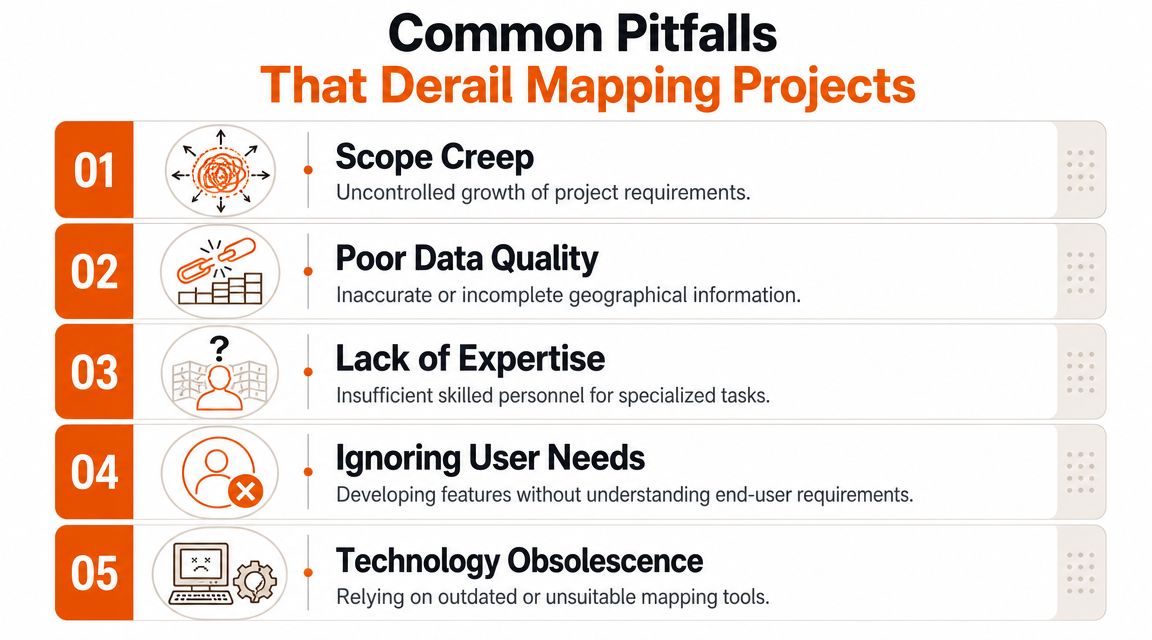
Pitfall one: bad data hidden behind a polished interface
You can style your way around many UI issues. You can't style your way around wrong coordinates, inconsistent address formats, stale layers, or poor source reconciliation. Teams often discover this too late because the demo dataset looked clean enough.
Fix it early. Run a data-readiness phase before feature development goes deep. Validate source reliability, update frequency, geometry quality, and edge cases. Put ownership on named people, not “the data team” as an abstraction.
Pitfall two: generic GIS thinking applied to a specific business problem
A map can reveal the wrong answer with confidence if the model behind it is weak. That matters in high-stakes use cases like infrastructure planning. Research on broadband planning in the UK shows that modern geospatial tools can identify underserved communities, but a major failure point is relying on generic GIS workflows that can't distinguish true service gaps from measurement noise or terrain issues, which demands deeper expertise, as discussed in this research on broadband connectivity gap analysis.
That lesson applies well beyond broadband. If your product claims to detect coverage gaps, route inefficiencies, risk clusters, or service blind spots, your model must reflect actual world conditions behind the data.
Pitfall three: scaling too late
A map that works with internal test data often collapses under real production behaviour. Filtering gets sluggish. Tile loads lag. Spatial queries stack up. Mobile sessions suffer first.
Use these checks before launch:
- Load test realistic map interactions: Pan, zoom, filter, cluster, search, and export. Don't test one API endpoint in isolation.
- Separate hot paths from heavy analysis: Keep user-facing interactions responsive even when back-office processing is expensive.
- Instrument usage patterns: You need to know which layers, queries, and workflows create actual load.
Pitfall four: building what users asked for, not what they need
Users often request “a map view” because they can't articulate the workflow gap. Your job is to translate that request into a decision support tool. Sometimes that means a map. Sometimes it means a ranked list with location context. Sometimes it means alerts or recommendations.
If a map doesn't help a user choose, prioritise, dispatch, investigate, or verify, it probably belongs lower in the roadmap.
Pitfall five: no owner for cross-functional complexity
Mapping features cut across product, data, infrastructure, design, and domain knowledge. If nobody owns the full outcome, hand-offs kill momentum. One team manages ingestion, another does UI, another handles platform costs, and nobody governs the whole capability.
That's where projects drift. Extreme Ownership fixes this. Put one accountable lead over business intent, data quality, and delivery risk. Not just sprint output.
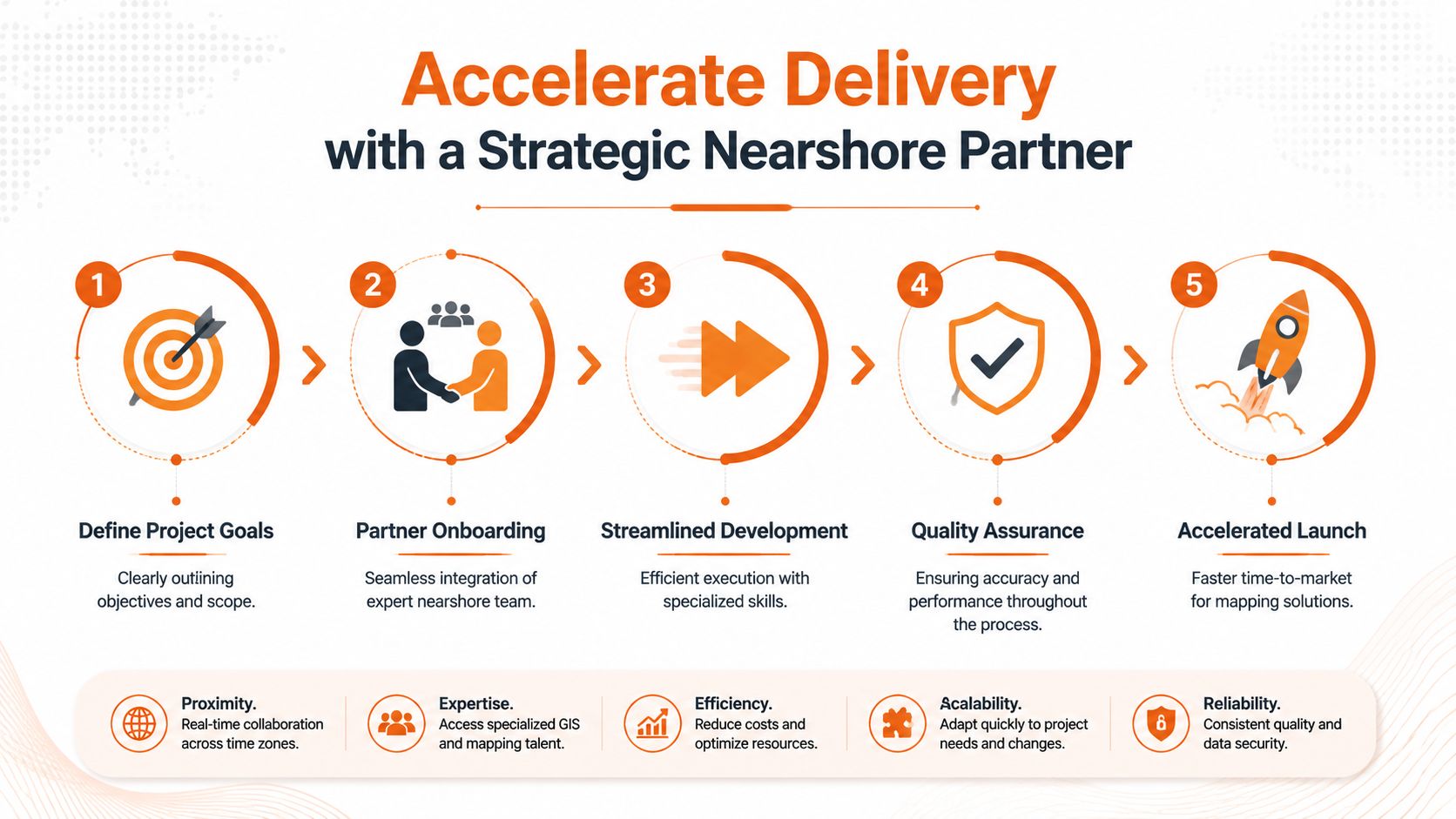
Accelerate Delivery with a Strategic Nearshore Partner
Most CTOs don't need more opinions about mapping technology. They need a way to ship the right thing without burning internal capacity on avoidable mistakes.
What a strong delivery partner actually changes
A good partner doesn't just add developers. That's staffing. Useful, but limited.
A strong nearshore team compresses decision time. They help you define which geospatial capabilities belong in the MVP, which should stay manual for now, where managed services are enough, and where custom engineering creates long-term advantage. They also bring patterns from adjacent products, which helps you avoid solving known problems from scratch.
Mapping projects usually stall in the gaps between disciplines. Product wants clarity. Engineering wants scope boundaries. Data teams want source confidence. Leadership wants predictable cost and delivery. A capable partner aligns those threads faster.
The operating model that works
The right model is ownership-driven and product-first:
- Start with a thin, valuable slice: Prove one business workflow, not the whole geospatial vision.
- Use senior engineers early: Spatial data issues don't respond well to junior trial and error.
- Integrate with your team's rituals: Shared backlog, shared observability, shared accountability.
- Design for handover from day one: Your internal team should gain capability, not dependency.
If you're evaluating collaboration models, this overview of nearshore software delivery is a practical reference for how to structure engagement without losing control.
Where nearshore makes the biggest difference
Nearshore tends to be most effective when:
- You need speed without a hiring delay: Geospatial and platform specialists are not easy to recruit quickly.
- Your roadmap is broad but uncertain: You need experienced product engineers who can trim scope intelligently.
- Your internal team is strong but stretched: External senior capacity helps without forcing a full outsourcing model.
- You're modernising an existing product: Mapping often has to fit legacy services, old data assumptions, and uneven documentation.
The best partner reduces uncertainty as much as they increase throughput.
That's the primary value. Faster delivery matters, but predictable delivery matters more. Technology in mapping has enough hidden complexity already. You want a team that spots the traps before they become architecture debt, cost surprises, or missed launch dates.
Your Roadmap to Mapping-Driven Business Success
A map isn't the goal. Better decisions are the goal. Faster workflows are the goal. More defensible product value is the goal.
That's why technology in mapping deserves executive attention. The choices you make around data quality, rendering, real-time architecture, vendor dependence, and team capability shape far more than a feature release. They shape cost, speed, control, and product differentiation.
Use a simple roadmap.
First, define the business decision your map must improve. Second, pick the minimum stack that can prove that value. Third, decide early whether you're buying convenience or building control. Fourth, attack data quality before UI polish. Fifth, put one accountable owner over the whole capability.
That's the #riteway mindset. Proactive. Ownership-driven. Outcome-focused.
If your current mapping initiative feels stuck, too expensive, too vague, or too fragile, don't solve it by adding another library or another sprint. Reset the decision model. Tighten the business case. Build around user action, not visual output.
The companies that win with mapping don't have the prettiest map. They have the clearest reason for using one, and the discipline to implement it properly.
If you're building a location-aware SaaS product and want a team that can turn mapping complexity into a clear delivery plan, talk to Rite NRG. They work like a strategic product and engineering partner, not a ticket-taking vendor, and they bring the ownership, seniority, and speed needed to ship mapping capabilities that effectively move the business.