Geospatial data is information tied to a specific location on Earth. In the UK, that data is often anchored to mapping infrastructure maintained by Ordnance Survey, founded in 1791, and for a SaaS business that turns location into a product asset you can use for sharper market insight, better user experiences, and smarter operations.
You're probably already sitting on location signals without treating them seriously. Customer addresses. Driver routes. Service coverage areas. Device coordinates. Property boundaries. Event logs with place-based context. Most founders see those as supporting fields. The teams that win treat them as a strategic layer across the product.
That's the definitive answer to what is geospatial data. It isn't “a map feature”. It's structured information that lets your software understand where something happened, what's nearby, what falls inside a boundary, what changed over time, and what action should happen next. That changes product design fast.
A delivery platform can improve routing logic. A fintech product can spot location anomalies. A proptech platform can compare parcels, transport links, and environmental constraints. A field service SaaS can turn dispatching from guesswork into an operational system. Same raw idea. Different business outcomes.
The mistake I see most often is treating geospatial capability as a front-end add-on. It isn't. It's part data model, part workflow engine, part competitive moat. If you build it the #riteway, with proactive ownership from data ingestion through user experience, you move faster and avoid the expensive rebuild that happens when teams bolt location logic on later.
From Location Pins to Business Wins
Your ops lead is escalating missed SLAs in one city. Sales wants to expand into three more. Product is debating dynamic pricing. Fraud alerts are rising, but nobody can tell which events are normal for that postcode, route, or device pattern. At that point, location stops being a field in a table and starts shaping margin, speed, and risk.
Geospatial data gives your product context for place. It adds the where behind customer activity, assets, routes, service areas, parcels, and risk zones, so your team can make decisions with spatial logic instead of guesswork.
What geospatial data actually means in business terms
At a technical level, geospatial data is structured data tied to a specific location. In business terms, it lets your platform answer questions that standard analytics misses. Which users are outside profitable coverage? Which jobs cluster badly for dispatch? Which properties fall inside a constraint zone? Which transactions fit a customer's usual geography, and which deserve a second look?
That context matters because location data only creates value when your systems share the same reference points. If engineering, operations, and analytics each use different boundaries or inconsistent coordinates, you get broken territory logic, bad reporting, and feature delays. Teams waste time reconciling spreadsheets instead of shipping.
The right move is simple. Treat location as part of the product model early. Build it into the workflows that drive revenue, fulfilment, compliance, and retention.
Practical rule: If location affects pricing, fulfilment, fraud, compliance, or user experience, make it a product capability with clear ownership.
Why founders should care early
The upside shows up fast:
- Sharper product decisions: You can spot regional demand gaps, service blind spots, and operational friction by place, then prioritise based on evidence.
- Better automation: Your app can trigger actions based on proximity, route progress, geofences, and exceptions outside expected patterns.
- Stronger commercial offers: Location intelligence often becomes a paid feature, from territory planning and route optimisation to site assessment and risk scoring.
Waiting gets expensive. Teams often hard-code one-off location rules into dispatch, pricing, or reporting, then realise the same logic is needed across mobile workflows, customer success, and analytics. Now the roadmap is stuck cleaning up architecture.
Start with the business decision, not the map. Ask which outcome improves when the product understands where something happened. That is the #riteway. Own the data model, the workflow, and the user experience from the start, and you get to value faster with far less rework.
Core Geospatial Concepts for Product Leaders
Good location features fail for boring reasons. Teams choose the wrong data model, mix coordinate systems, or import files nobody can trust. Product leaders do not need GIS theory. They need a working mental model that helps them choose faster and avoid expensive rework.
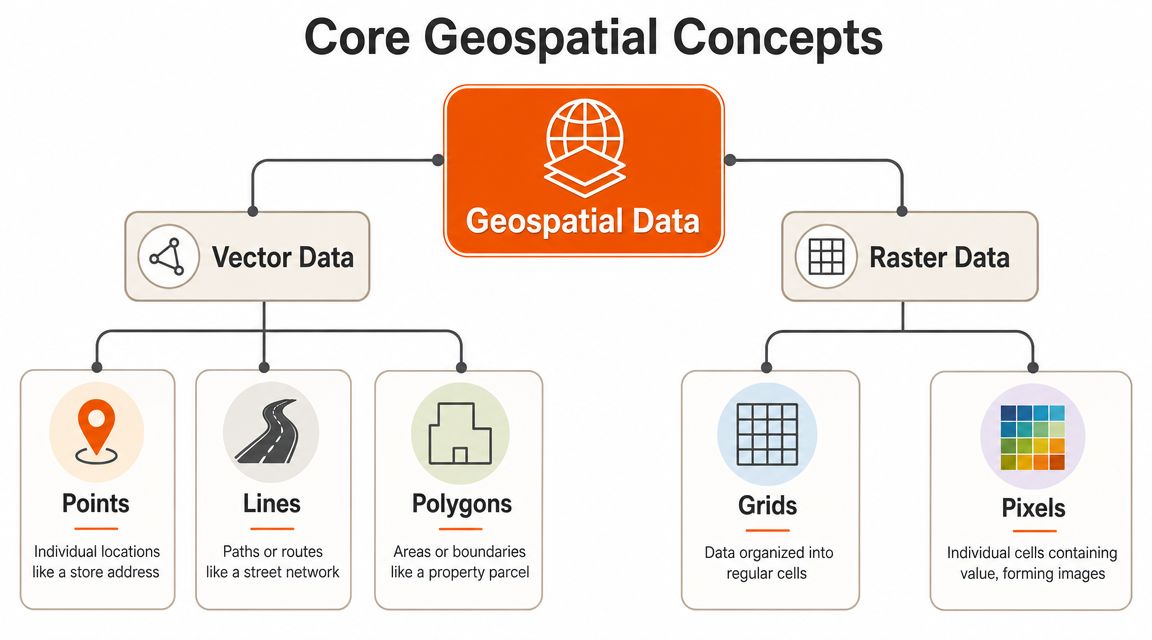
Vector vs. raster: a practical guide
Vector data represents clearly defined things using points, lines, and polygons. Use it when the product needs to know where a thing is, what boundary it sits inside, what it is near, or how it connects to something else.
- A point marks a single location, such as a customer address, driver position, asset, or store.
- A line captures a path or network, such as a route, road, delivery path, or utility connection.
- A polygon defines an area, such as a service zone, sales territory, parcel, flood boundary, or geofence.
Raster data stores values across a grid. Use it when the product needs to work with surfaces and conditions that vary across space, such as imagery, elevation, heat, rainfall, vegetation, or pollution.
This choice shapes the product. Build dispatch zones with polygons. Build slope analysis from elevation rasters. Overlay satellite imagery when users need visual context. Pick the wrong model and your team will spend months forcing the feature to do a job the data structure was never built for.
Core requirements for data you can trust
Usable geospatial data needs three things. Location, spatial reference, and metadata.
Location gives each feature its position. Spatial reference tells the system how those positions are measured on the earth. Metadata explains source, coverage, currency, lineage, and intended use. Skip any of those and the product gets unreliable fast.
In UK geospatial work, many authoritative datasets use British National Grid (OSGB36 / EPSG:27700). Modern services also exchange data through formats and protocols such as WMS, WFS, and GeoJSON, as described in the INSPIRE technical guidance for geospatial specifications.
The business implication is simple. If engineering loads one dataset in EPSG:27700 and another in a different reference system without proper transformation, the layers will not align. Territory logic breaks. Distance calculations drift. Reporting becomes suspect. If metadata is weak, nobody can answer basic product questions about freshness or fitness for purpose.
| Attribute | Vector Data | Raster Data |
|---|---|---|
| Best for | Discrete objects with boundaries | Continuous surfaces or imagery |
| Common examples | Store points, roads, parcels, zones | Satellite imagery, elevation, heat surfaces |
| Typical business use | Routing, geofencing, asset boundaries | Environmental context, visual overlays, modelling surfaces |
| Geometry style | Points, lines, polygons | Grids and pixels |
| Product question it answers | “What is where, and what falls inside or near it?” | “How does a value vary across an area?” |
Formats and standards that prevent avoidable pain
You do not need to memorise every file type. You do need to recognise the few that affect delivery speed and interoperability.
- GeoJSON is a strong default for web apps and APIs. It is readable, widely supported, and easy for product and engineering teams to work with.
- WMS serves rendered map images. Use it when the product needs visual map layers but not the underlying features.
- WFS serves actual geographic features. Use it when the application needs to query, filter, or analyse the geometry itself.
- KML still shows up in legacy workflows and partner exchanges, especially where older GIS tooling is involved.
Here is the rule that saves time. Choose the structure based on the decision the product needs to make. That is the #riteway. Own the model early, set standards before data starts spreading across services, and your team ships geospatial features with far less cleanup later.
Unlocking Business Value with Geospatial Data
Location data earns its keep when it improves revenue, margin, speed, or customer trust. If it doesn't do one of those, don't build it yet.
A lot of founders ask for a map because competitors have one. That's weak thinking. The stronger move is to ask what business mechanism location can improve. Routing. Allocation. Market selection. Risk screening. Coverage visibility. User context. That's where value appears.
To make the use cases tangible, this visual sums up where geospatial capability makes an impact:

Where SaaS products get leverage
A logistics platform can combine vehicle location, road data, and service constraints to improve dispatching. That usually means fewer manual decisions, clearer ETAs, and more efficient route planning.
A retail or proptech platform can use catchment areas, transport access, parcel boundaries, and local context to support site selection or portfolio analysis. The product becomes more than a database. It becomes a decision tool.
An insurance product can use boundaries, asset locations, and environmental layers to support underwriting or claims workflows. A fintech app can compare user behaviour with expected location patterns to flag activity that deserves a second look.
Product patterns worth building
Use these patterns when you want business value fast:
- Geofencing: Trigger actions when a user, asset, or worker enters or leaves a defined area.
- Nearest-match logic: Assign the closest driver, technician, depot, or available resource.
- Coverage intelligence: Show what services, risks, or constraints apply at a specific address.
- Territory design: Give teams cleaner regional boundaries for sales, operations, or field support.
- Spatial enrichment: Add context from nearby infrastructure, environmental layers, or administrative boundaries.
This short video gives a useful visual sense of how geospatial capability translates into real-world operations and planning:
What founders should do with this
Don't start with five use cases. Pick one. The best first geospatial feature usually has three traits:
- It solves a painful operational decision.
- It uses data you can access now.
- It can surface clearly in the workflow, not just in reporting.
That could be route allocation in logistics, address-level service qualification in home services, regional fraud checks in fintech, or parcel intelligence in proptech. The #riteway mindset applies here hard. Own one outcome, scope tightly, validate quickly, then expand once the data pipeline and user behaviour prove the value.
Sourcing and Acquiring Your Location Data
A founder launches a promising location feature, the demo lands well, then the product stalls because the address file is patchy, the boundaries are inconsistent, and nobody trusts the output enough to automate anything. That is not a mapping problem. It is a data sourcing problem.
If location is going to influence pricing, allocation, routing, risk checks, or service eligibility, treat geospatial data as a product asset from the start. Choose sources based on the decision you need to make, the cost of being wrong, and how quickly the data changes. Teams that get this right ship faster because they stop rebuilding logic around bad inputs. That is the #riteway. Own the data decision early, keep scope tight, and build on sources your product team can defend.
Three sourcing options that matter
Most SaaS products get location data from three places. The best choice depends on whether you are proving a workflow, scaling a revenue driver, or building proprietary signal.
Open and public datasets
Use open data to get to a working product fast. It is a strong fit for boundaries, transport networks, points of interest, environmental context, and other baseline layers that help your app answer “where” with enough confidence to validate a use case.
Check licensing, coverage, update frequency, and format before you commit. Cheap data becomes expensive when support teams start correcting edge cases by hand or customers spot gaps before your team does.
Commercial data vendors
Pay for commercial data when precision changes the business result. If a wrong polygon blocks a sale, sends a technician to the wrong place, misprices a quote, or creates compliance risk, buy the dataset that reduces that failure rate.
Good vendors do more than sell files. They provide consistency, support, and cleaner reference data, which cuts months of internal cleanup. For product leaders, that often matters more than the raw dataset itself.
Data you collect yourself
First-party location data is where a defensible product starts to form. User-submitted addresses, mobile pings, telematics, field events, sensor output, and workflow timestamps reflect how your platform operates in practice, not how a third party models it.
That advantage comes with responsibility. You need validation rules, consent handling, retention policies, and a clear process for correcting bad records. If you skip that work, your “proprietary” dataset turns into operational noise.
Specialist acquisition methods
Some products need location data that standard datasets cannot provide. Field operations, construction, utilities, logistics, and property workflows often need fresh site-level capture. In those cases, drone surveying and mapping techniques can improve accuracy and coverage, but they also add processing, storage, and quality-control requirements that need product ownership, not just technical curiosity.
Connected devices create a different sourcing challenge. If your platform ingests coordinates from vehicles, wearables, meters, or industrial hardware, data acquisition and platform design are the same decision. A strong IoT architecture for connected platforms helps your team ingest, validate, and route spatial event streams before they spill into reporting errors, alert fatigue, and brittle feature logic.
Bad source selection rarely fails in one dramatic moment. It shows up as manual workarounds, slower releases, customer exceptions, and product teams that stop trusting their own automation.
Make the call based on business risk. Start with open data when you are proving value. Buy commercial accuracy when location affects revenue or compliance. Collect your own data when the signal itself can become part of your moat.
The Technical Blueprint for Geospatial Features
Your product looks impressive in a demo. A customer opens it in the field, the nearest technician is wrong, a territory boundary fails, and the map says everything is fine. That is what happens when a team ships the visual layer before it builds the geospatial system underneath.
A geospatial stack for SaaS has five jobs: ingest location data, store it in a spatially aware database, process it at the right speed, expose it through APIs, and present it in a UI people can use to make decisions. Get those layers right and location becomes a product asset. Get them wrong and your team spends every sprint fixing edge cases.

Start with storage that understands geography
If your app needs spatial queries, use infrastructure built for spatial queries. PostGIS is the default choice for good reason. It adds native support for geometry and geography types, so your team can run distance calculations, point-in-polygon checks, routing support queries, and boundary intersections inside the database instead of stitching together awkward app-side logic.
For many SaaS products, that is the right centre of gravity. Customer records, operational entities, and spatial features stay close together. Product logic stays easier to reason about. Delivery gets faster because your engineers are building features, not compensating for weak storage decisions.
If you are still shaping your platform foundations, this guide to choosing a technology stack is useful context. Geospatial features need to sit inside your core architecture, not off to the side as a specialist add-on.
Process for the product, not for the demo
Choose your processing model based on the business decision you need to support.
Real-time processing
Use real-time pipelines when location must trigger action immediately. Dispatching a field engineer, detecting a geofence event, updating live asset status, or rerouting work based on movement all depend on low-latency ingestion and fast spatial lookups. In these cases, every extra transformation step adds delay and risk.
Batch and scheduled processing
Use batch workflows when the value comes from analysis and planning. Territory design, route optimisation reviews, historical benchmarking, catchment analysis, and large-scale enrichment usually belong here. These jobs can run on a schedule and feed dashboards, planning tools, and operational reporting without putting pressure on your live system.
Most serious products need both. One path drives action. The other improves the next decision.
APIs and visual layers that keep teams moving
Mapping tools are the part founders see first. Mapbox, Google Maps Platform, and Leaflet help your team render maps, display markers, and build familiar interactions. These tools are useful for the presentation layer, but they sit on top of the core architecture, which must be solved first.
The harder engineering problem is interoperability. Your system will eventually combine multiple coordinate reference systems, mixed schemas, third-party datasets, and product-generated events. If you leave those concerns until QA, release speed drops and trust in the feature drops with it.
Design the blueprint to handle that reality from day one:
- Validate on ingestion: Check coordinate reference systems, geometry validity, and metadata before data reaches production tables.
- Normalise key layers: Standardise core references early so joins, overlays, and downstream analysis do not break later.
- Separate concerns: Keep storage, processing, APIs, and visualisation loosely coupled so each layer can change without destabilising the rest of the product.
- Design for future joins: Assume you will combine public data, commercial datasets, and customer-generated location data over time.
Build the geospatial engine first. Add the map after that. Teams that reverse the order usually end up rebuilding both.
The #riteway approach is simple. Own the architecture early, make interoperability a product decision, and solve the hard parts before customers find them for you.
Managing Quality, Privacy, and Legal Risk
A founder launches a location-based feature, the demo looks sharp, and early users click around the map without friction. Then serious problems emerge. Coverage looks wrong in one city, an ops team makes a bad decision from stale coordinates, and a customer asks why you stored precise location longer than necessary.
That is how geospatial work fails in SaaS. Not because the map looks bad. Because weak data controls turn a promising feature into product risk.
Quality means decision-grade data
Precise coordinates are not enough. Your product needs location data that is fit for the decision it drives. That includes bounding geometry, positional accuracy, timestamp context, source lineage, and clear rules for when data is too old or too incomplete to trust.
Set that standard early. Product, engineering, and operations should agree on what “usable” means before the feature ships.
If you skip that step, the business impact is immediate. Territory logic drifts. Historical comparisons break. Support teams cannot explain why the product produced the wrong result. Customers stop trusting the workflow, even if the interface still looks polished.
Privacy and governance need product rules, not cleanup later
If your product collects user, asset, or device location, treat it as sensitive data from day one. Write down why you collect it, who can access it, how long you keep it, and what level of precision each workflow needs.
Use these operating rules:
- Collect with a defined purpose: Only store the level of location detail the workflow requires.
- Reduce precision where possible: City, postcode, or geofence often delivers the business outcome without storing exact trails.
- Limit access by role: Raw location history should never be widely available across support, sales, and product teams.
- Keep lineage visible: Your team should be able to trace where each dataset came from, what changed, and which model or workflow uses it.
- Review controls regularly: A structured information technology security audit exposes weak permissions, retention gaps, and policy drift before they become customer or compliance problems.
Strong geospatial products earn trust through outcomes and discipline.
The #riteway is simple. Treat quality, privacy, and legal handling as part of the feature, not admin around it. Teams that take ownership early ship faster, defend decisions with confidence, and avoid the expensive rewrite that comes after customers or regulators find the holes for you.
Your Next Move From Plan to Platform with Rite NRG
You don't need a giant GIS programme to start. You need one focused use case, one reliable data pipeline, and one team that takes ownership of the whole path from concept to release.
That's where most companies stall. They know location could improve the product, but internal teams are split across priorities, architecture debates drag on, and the first version turns into a science project. The better route is an MVP that proves business value quickly, with clear technical decisions around data source, storage, processing, and workflow integration.
A strong first move looks like this:
- Pick one painful decision: routing, qualification, allocation, coverage, risk, or territory logic.
- Choose fit-for-purpose data: not the biggest dataset, the one your workflow can trust.
- Build a thin vertical slice: ingest, process, expose, visualise, and measure usage in one production-minded prototype.
That's exactly where the #riteway matters. Extreme Ownership. High energy. Proactive delivery. No waiting for someone else to clean up data issues, clarify scope, or chase integration blockers.

If you want geospatial capability to become a product advantage instead of a backlog idea, move now. The teams that win with location data aren't the ones with the fanciest maps. They're the ones that ship useful workflows fast, learn from real usage, and scale the architecture with discipline.
If you're ready to turn location data into a real product capability, talk to Rite NRG. We help SaaS companies move from idea to working platform fast, with senior teams that take ownership of delivery, architecture, and business outcomes the #riteway.